
Custom characters page: How to horizontally align images / containers?

Hi guys,
I'm building a custom character roster page and I have a simple question (I hope :D ): How do you align containers horizontally? Below you find what I made so far - 2 containers, each containing an image link and a character link, that are currently displayed in a standard vertical order:
---
<td><a href="/characters/char1">
[[File:1449951 | class=media-item-align-none | 390px | test_iconsize.png]]
[[Character 1 page link]]
</a></td>
<td><a href="/characters/char2">
[[File:1449934 | class=media-item-align-none | 390px | test_iconsize.png]]
[[Character 2 page link]]
</a></td>
---
1. How can I align them horizontally?
2. How can I then change their alignment to center (at the moment they are left-aligned)?
Thanks a lot in advance :)

Howdy, Stranger!
It looks like you're new here. If you want to get involved, click one of these buttons!


Comments
Hey @theS1m, this isn't my area of expertise, but I've reached out to the team to see if they can help you out!
Obsidian Portal Dungeon Manager || [email protected]
Thank you, just to show visually what I mean:
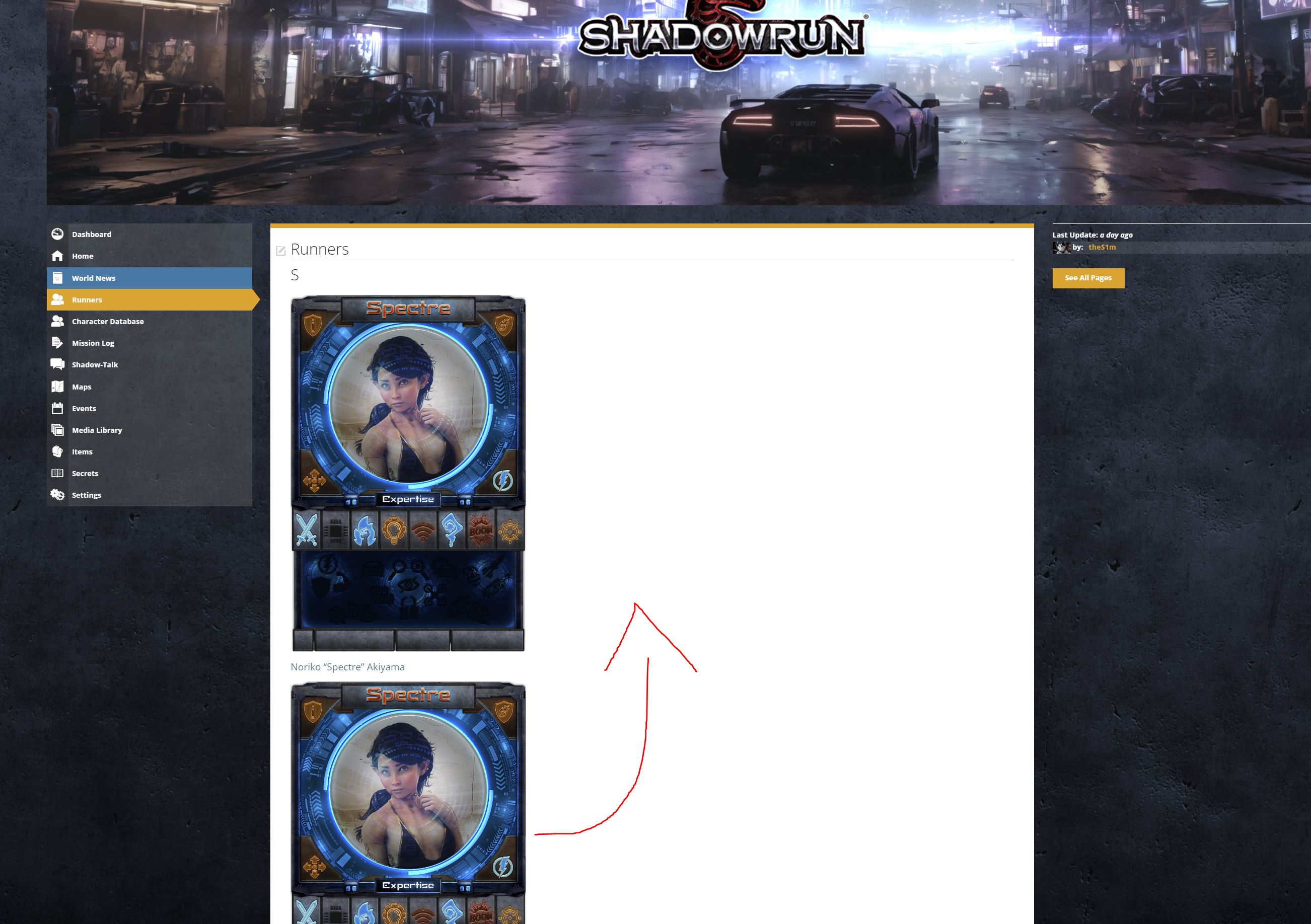
Just to make sure we're going down the right road ... it kind of sounds like you're trying to create a filtered list of Characters.
Have you considered using a filtered link to the Characters page as your Runners link?
For example, you could put a "runners" tag on the Runners and then use a filtered link.
Here's one filtered to your Fixers (I added the "expand_filters=false" to hide the filter panel when it displays):
https://shadowrun-livingworld.obsidianportal.com/characters?filters=tag_fixer&expand_filters=false
Feel free to say if that's not what you were wanting, and we can get into what it would take to create a page of images/links that arrange in rows horizontally and centered.
Obsidian Portal Developer
Thanks for your swift feedback :)
I am using your suggested view above with tags for general overview of PCs and NPCS, but for the player characters we have these cards as you can see above which show strengths and weaknesses of a character directly in the overview without needing to go to the character page.
That card is very helpful for our game masters to scroll the list and make a rough selection of characters that they might choose for their mission.
To do this in CSS, first put each character card inside of a div, all of the div's need to point at the same class. So something like <div class=charcard>CHARACTER CARD CONTENT</div>. Then, for each horizontal row of cards that you want to see, create another div with a custom class for the row, again all of the row divs need to reference the same class, so something like <div class=charrow>CARD DIVS</div>. Place the card divs you want moved into this row div.
One complete row with two cards would look like: <div class=charrow><div class=charcard>CHARACTER CARD CONTENT</div><div class=charcard>CHARACTER CARD CONTENT</div></div>.
Do that again for each row of characters, all class names need to remain the same for ease of CSS.
Then, the CSS would look like:
GM of Stream of Kairos - 2025 Campaign of the Year
GM of Rise of the Durnskald: Wrath of the Fallen Goddess - February 2016 CotM
GM of Core: The Ashes of Alcarna - April 2020 CotM
Need CSS Help? It may be covered here: Abersade's CSS Hub
I used code similar to that to create https://streamofkairos.obsidianportal.com/wikis/main-page
You will likely need to adjust the height and width in the CSS and may need to adjust the margins to get it to look right with your design.
GM of Stream of Kairos - 2025 Campaign of the Year
GM of Rise of the Durnskald: Wrath of the Fallen Goddess - February 2016 CotM
GM of Core: The Ashes of Alcarna - April 2020 CotM
Need CSS Help? It may be covered here: Abersade's CSS Hub
Wow, thanks! That was really helpful. I made this:
Edit: In the meantime I figured out how to increase the horizontal spacing between the cards. :)
Final question:
Can you tell me how to center the text below each card (at the moment it is left aligned :) )
Thanks a lot!
You should be able to throw a text-align: center; inside the charcard css to align the text the way you want.
GM of Stream of Kairos - 2025 Campaign of the Year
GM of Rise of the Durnskald: Wrath of the Fallen Goddess - February 2016 CotM
GM of Core: The Ashes of Alcarna - April 2020 CotM
Need CSS Help? It may be covered here: Abersade's CSS Hub
You are a scholar and a gentleman.
Thanks a lot. :)